 YH-M
YH-MMediaQuiver
A feature-rich media explorer for REAPER.
$10Early access price. It goes up to $15 at version 1.0.
On sale soon.
On sale soon.
Windows or macOS, REAPER 7.0 or later, ReaImGui 0.10 or later, SWS.
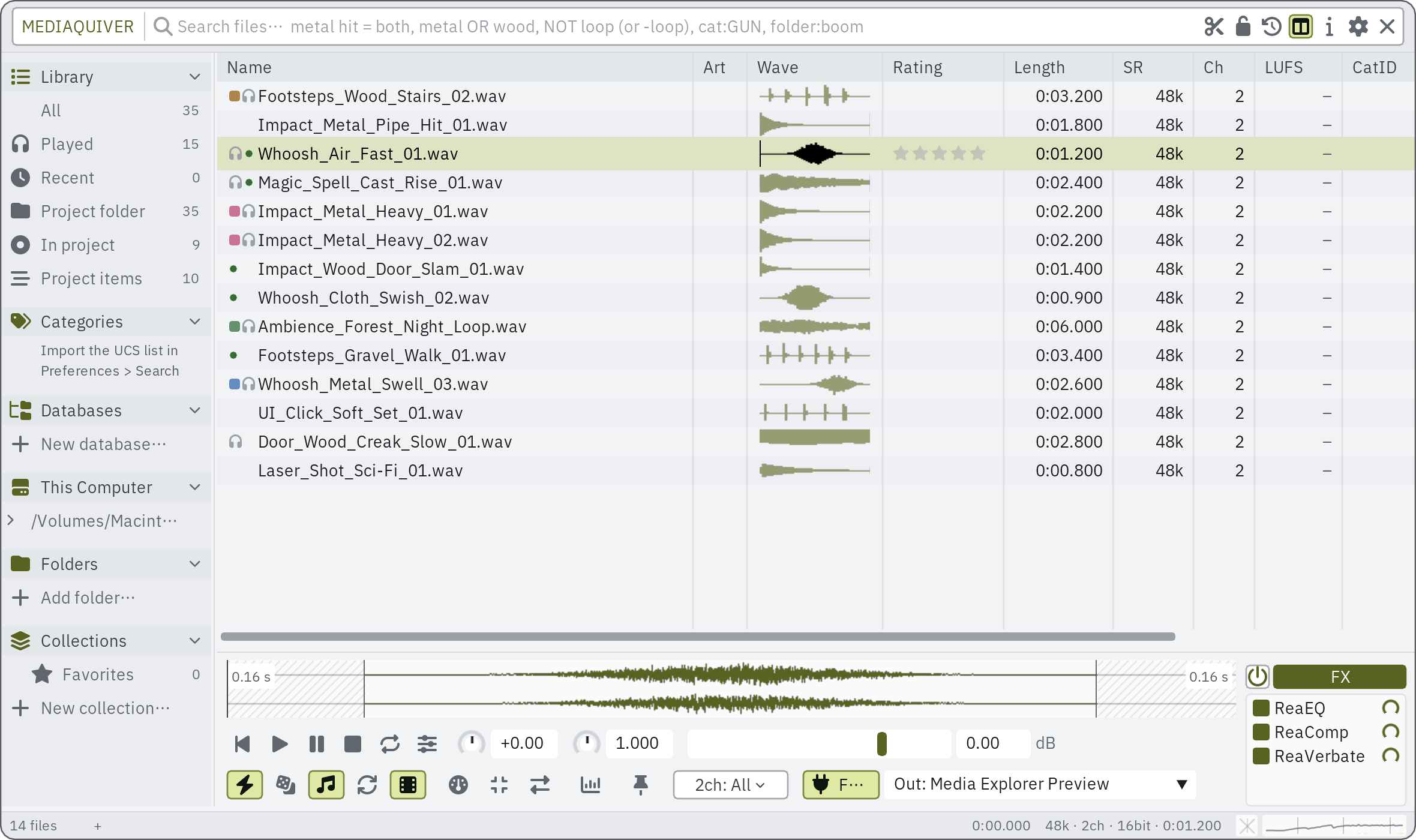
MediaQuiver puts REAPER's Media Explorer databases and your own folders in one list and searches them as you type.
What it does
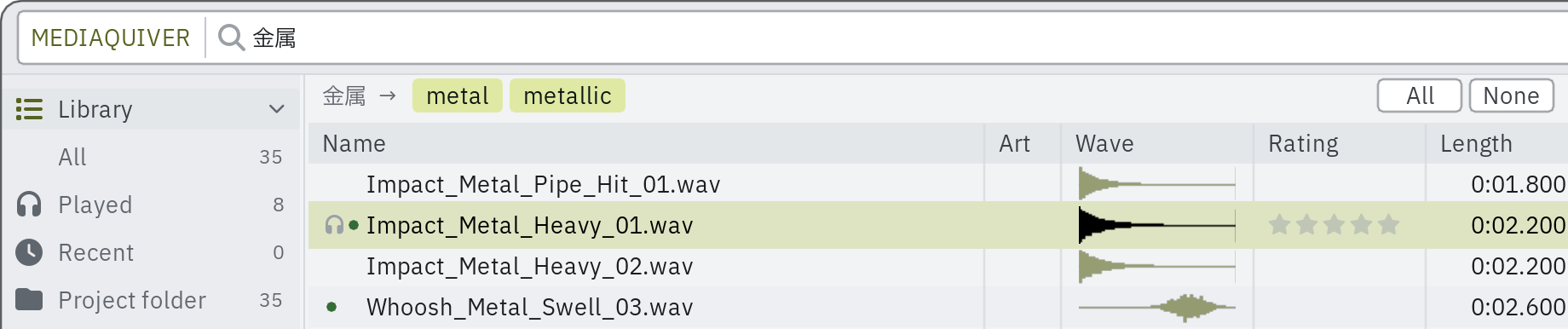
- Search in Japanese, Chinese or Korean and find English file names; English synonyms and your own dictionary join in, and any suggested word can be left out.
- Audition through the preview track's FX chain, shown beside the waveform; the same chain goes onto the placed take, or is rendered into a new file in the background.
- A file, several files or just a range can be dragged onto the arrange the way REAPER's own Media Explorer does.
- A file that holds several takes is listed one row per take; its silences are marked and can be skipped on playback.
- Which of your projects use each file: a count per file, stars that follow use, and the project opened at the item that uses it.
- For game audio: play a random file from the list, or swap an item's source for the next or a random file in its folder.
- Audition to picture: the edit cursor moves with the preview, so REAPER's video window follows; when the preview stops, the cursor goes back to where it was.
What you need
- REAPER
- 7.0 or later
- ReaImGui
- 0.10 or later (from ReaPack)
- SWS
- for playback (from ReaPack)
- System
- Windows or macOS
Optional
- YH-M Native extension: the drag onto the arrange behaves like REAPER's own Media Explorer, and files are read in the background.
- js_ReaScriptAPI: smaller conveniences; everything works without it.
Price and licence
- Price
- $10 USD, the early access price. It goes up to $15 at version 1.0. Where tax applies, Gumroad adds it at checkout.
- Trial
- 14 days with every feature, before you buy. No key and no card needed: install it with ReaPack and run it.
- Licence
- One person, on up to three of their own computers.
- Updates
- Every 1.x update is included, through ReaPack.
- Refunds
- Sales are final: the trial is there to try it first. This does not limit your statutory rights.
Known issues
One to three lines, kept current.
Changes
0.1.13 2026-10-14
- Fixed: before a UCS list is imported, the note under Categories touched the left edge of the sidebar; it now lines up with the rows.
- The PlugRail panel: a long developer name no longer hides the plug-in's name.
- The PlugRail panel: half-installed ReaPack files that are not effects (code libraries, pictures) are no longer listed as plug-ins.
- The Drag and drop setting's description now matches how a drag out of the window works.
- New: the action "YH-M MediaQuiver - Find sounds similar to the selected item" finds the sounds in your library that sound like the part of the source you hear in the first selected item (trim, playback rate, sections and reverse are followed) and shows them in MediaQuiver, starting it if it is not running. Like Find similar sounds, it needs the YH-M Native extension and the YH-M Sound Model package.
- New: the action "YH-M MediaQuiver - Group the selected items by similar sound" sorts the selected items into groups of sounds that sound alike. A slider sets how alike counts, and the items in the arrange view change color as you move it; Apply can color the items, put each group in its own fixed lane of the track and move the items so each group sits together, in any combination, as one undo step. It needs the YH-M Native extension and the YH-M Sound Model package 1.0.1 or later.
- New: while a similar-sounds result is shown, a strip above the list names the sound it was searched from (with the searched range, if there was one, and how many sounds were found), and a × closes the result. Click the name to see that sound in the waveform; the list keeps its selection.
- New: the waveform's right-click menu has Find similar sounds and, when a range is drawn, Find sounds similar to the range, as the list's menu does.
- Double-clicking the sound in the waveform now also works in a file that holds only one take (it selects that take, without the silent ends), and in a file with silent ends and nothing else to cut by (it selects the part between them).
- Fixed: with "Play/Stop plays the preview while a plug-in on its track is focused" turned on, the project no longer sounds for an instant when you press Play (needs YH-M Native 0.3.6).
- Fixed: dragging several take rows into the arrange with the OS drag gave every item the length of the whole file; each item now has the length of its take.
- Fixed: dropping several files on the arrange while REAPER asks how to insert them: the channel setting, rate, pitch, volume and preview FX were not applied if the question stayed open for a moment; they are now applied after you answer (on macOS, or without js_ReaScriptAPI, if you answer within 30 seconds).
- Changed: for the automatic stars, a file now counts once per project for being inserted from here. Placing the takes of one file one by one in the same project no longer raises its stars each time; counts you already have are kept.
- Fixed: the "Sound index N%" in the status line counts each file once and goes away when every file is indexed. A file listed in two databases, or a file with the same audio as another file, used to keep it below 100% (for example at 80%) even when the index was complete.
- After MediaQuiver starts, checking which files are already in the sound index takes a few minutes instead of half an hour or more on a large library.
- All lists a file once even when it is both in one of your MediaQuiver databases and in a REAPER Media Explorer database (the row from your MediaQuiver database is shown). Searches in All and the category counts follow. Choosing a database in the sidebar still lists all of its files.
- New: the files of your own databases have Title, Artist, Album, Genre, Comment, Date and Timecode. They are copied from REAPER's Media Explorer database when it has the same file, and otherwise read from the file while "Read each file's description for the Description column and search" is on (Preferences > Background work): in the background with YH-M Native 0.3.7, or without it for the files you look at. They show in Info and are found by a search on those fields.
- Fixed: with a large library, memory could keep growing during long background work until REAPER ran out of memory. The memory clean-up now keeps up.
- Fixed: if the database cache could not be read when MediaQuiver started (for example while another program had the file open), the database was scanned again from scratch and the cache was then overwritten, losing the descriptions and other values already read. MediaQuiver now waits for the file and never overwrites a cache it could not read in full (it tells you once). The previous cache is kept as a .bak file, and a save that fails leaves the cache as it was.
- Fixed: what a long build has read (for example descriptions) is saved every 10 minutes and when MediaQuiver closes, so a restart no longer throws it away. Closing no longer leaves a half-written cache file behind.
- Fixed: rescanning a database or folder while its drive is not connected (no files are found) no longer replaces its list with an empty one. The previous list is kept, with the descriptions and other values already read, and MediaQuiver says why.
- If the database cache cannot be saved three times in a row, MediaQuiver now says so. The cache on disk stays as it was, and saving is tried again.
0.1.11 2026-10-13
- Without the SWS extension, the status line now says at start that playback needs it.
- Fixed: Preferences said a pinned file shows a triangle (it shows a pin) and that a file's preview waits for its loudness value (it starts at once and adjusts).
- The Similar column is no longer offered in the Columns menu; it appears by itself with similar-sound results.
- Preferences no longer name tools that are not part of MediaQuiver.
- Japanese search: a word found only in the general dictionary becomes one-word chips (angry, not get angry), and only words used in your library are offered. Chips from the other word lists that your library does not use are shown dimmed, after the others.
- MediaQuiver no longer keeps its dictionaries open, so ReaPack can update YH-M Shared on Windows while MediaQuiver is ready in the background. This update itself still needs MediaQuiver quit (right-click its window > Quit) first.
Older versions
0.1.10 2026-10-13
- Renamed: YH-M MediaExplorer is now YH-M MediaQuiver. The first time it opens, your settings and the data it keeps (played history, the library's index and the rest) move over. Shortcuts and toolbar buttons made for MediaExplorer keep working through the YH-M MediaExplorer package, which now only opens MediaQuiver.
- New: a channel button on the transport ("2ch: All") opens the channel menu, with its keys. While not every channel is heard, a badge on the waveform says which ones are, and a click on it brings all of them back.
- New: Preferences > Background work shows in one place what is read from your drives in the background, and when. Playback, Insert and Library are regrouped by what they do.
- Faster: the suggested words (translations, related words) appear right after you stop typing instead of waiting for the whole search on a large library.
- Changed: Next page and Previous page are now Ctrl+Alt+Right / Left (Cmd+Opt on macOS). If you had given them other keys, yours are kept.
- Deleting a database, removing a folder from it, clearing or deleting a collection, deleting a saved search, closing a page and clearing the Recent list now ask first.
- The online model for translation is shared with Rename: the API key is entered once. A key you entered in MediaExplorer moves there, unless one is already set.
- The PlugRail panel (preview FX) searches the way PlugRail does and lists every plug-in.
- Light is the default theme. A theme you chose yourself stays.
- The empty part of the search field moves the window when dragged.
0.2.0 as MediaExplorer 2026-10-13
- MediaExplorer is now called YH-M MediaQuiver. This version keeps the shortcuts and toolbar buttons you gave MediaExplorer working: each one opens the same thing in MediaQuiver. Your settings and library come along.
- Install YH-M MediaQuiver from ReaPack (Extensions > ReaPack > Browse packages). Until it is installed, these actions say so and open the package browser at it.
0.1.9 as MediaExplorer 2026-10-08
- New: change the key of any shortcut, or leave an action without one (Preferences > Shortcuts). Click a key and press the new one, with Ctrl, Shift or Alt if you like; Esc cancels, Backspace or Delete leaves the action without a key. A key another action already uses asks first and then takes it from that action. Each changed key has a Reset, and Reset every key brings them all back. Menus, the command palette and tooltips show the keys you chose.
- Faster: while the preview index reads your library from a spinning drive, the sound index for similar sounds rides along: it takes each file right after the preview index has read it, while the file is still in memory, so both are built by the same single read instead of fighting over the drive (on a USB drive the sound index went from 0.15 to about 2.8 files a second, and the preview index kept its speed). On a solid-state drive the two simply run side by side. The status bar and Preferences > Similar sounds say "along with the preview index".
- The sound index also pauses while you preview, browse or build, as the preview index does.
- Fixed: when the preview index started reading a spinning drive while the sound index still had files waiting, the sound index stopped until the whole preview index was built. It now drops what was waiting once the preview index has been reading that drive for a minute, and rides along (the files already indexed stay).
- Fixed (Windows): a file the sound index took along with the preview index was later read from the drive again.
- Fixed: Ctrl+, (Cmd+, on a Mac) opens Preferences, as the command palette always said.
- Clearer: Preferences > Similar sounds says how long the first index takes (about an hour or two for 20,000 sounds on a solid-state drive, a day or more for a very large library on a spinning drive), the message when the model is ready says the index is now being built, and while it is still being built a search says it looked among the sounds indexed so far.
0.1.8 as MediaExplorer 2026-10-08
- New: the preview index (Preferences > General > Preview index). Choose a folder for it (about 9 KB a file; nothing is read or written before you do) and every file of your databases is read once in the background. A file in the index shows its whole waveform the moment it is selected and plays at the right loudness at once, without being read again from its drive. Reading pauses while you preview, browse or build and while REAPER plays or records, and carries on where it stopped. Needs the YH-M Native extension 0.3.5.
- The preview index reads several files at once on a solid-state drive (one at a time on a spinning drive), moves with its folder instead of being built again (Preferences > General > Preview index > Move it to another folder…, and when the data folder moves with it), tidies itself in the background, gives the list its small waveforms without reading the files, and still shows the silent ends at once after you change the silence threshold.
- Faster: moving through a list with the arrow keys starts each file two to eight times sooner than before.
- Faster: a file whose loudness has not been measured yet plays at once, and normalizing eases in when the measurement arrives, instead of waiting for it (as REAPER's own Media Explorer does).
- Better: with Render Through The Preview FX on, an inserted file is placed at once and its effects are rendered a moment later in the background, sounding exactly as it did in the preview (the preview's volume and normalizing come before the effects). The render is an undo step of its own, and a render you undo is not done again.
- New: three more channel choices in the status bar's channel menu: Side (left minus right), M/S decoded to left and right, and a 3- to 8-channel file folded down to stereo. Inserting with one of them writes the sound to a new WAV file in the project's media folder in the background and places that file: a range at once, the whole file a moment later. Needs the YH-M Native extension 0.3.5.
- Fixed: such a written file showed no waveform in the arrange view; it now does at once, also after Undo.
- New: Find similar sounds (right-click a file, or a range of the open file): the files of your library that sound alike, best first, with a Similar column. Needs the optional "YH-M Sound Model" package from ReaPack (Apple Silicon Macs and Windows 64-bit) and the YH-M Native extension 0.3.5. Everything runs on this computer.
- Background reading (the preview index, REAPER peak files and the measuring after a build) waits while REAPER plays or records, so it never competes with your project for the drive.
- While the preview index reads a database, that database's right-click no longer offers Measure loudness: the index measures the same files.
- Better: English synonyms reach much further and are on by default (Preferences > Search > Translation). A broad word also finds its kinds and close relations (wind also finds breeze, gust, gale, storm, hurricane and air); a narrower word offers the broader one unchecked under the search box (breeze offers wind: click it to use it). Core words such as wind, rain and fire are now in the list, matched only as whole words of a file name: wind finds Wind_Gust, WindHowl and winds, not window. The word you type is still found anywhere in a name.
0.1.7 as MediaExplorer 2026-10-03
- New: the channel field in the status bar (48k · 2ch · …) opens a menu to hear and insert a mono mix, the left or right channel, one channel of a multichannel file, a pair of channels, or left and right swapped. The inserted take gets the same channel mode, so it sounds exactly as it did in the preview (the preview needs the YH-M Native extension 0.3.3). The choice carries over to the next files and starts as recorded each time MediaExplorer opens.
- New: write UCS information into a WAV file's iXML (Ctrl+E): CatID, Category, SubCategory, FX name and Library. Type a CatID and, with the UCS table imported, Category and SubCategory fill in by themselves. The description is also written to the iXML description, so other tools read the same text; everything else already in the file's iXML is left as it was.
- New: with several WAV files selected, Ctrl+E has a Find / Replace for the descriptions of all of them at once (plain text, with or without matching case), and tells you how many places changed in how many files.
- New: "Loop the preview" uses a WAV file's own loop points (the smpl chunk): the file plays from the start into the loop and then repeats the loop, as a sampler does.
- New: the hardware output for previews (Preferences > Playback > Output > Hardware output): any stereo pair or a single output in mono. Also used when the named or selected track is missing.
- New: send a file to Cartridge on the selected track (right-click, or the command palette), next to ReaSamplOmatic5000.
- New: artwork embedded in the file itself (MP3 / WAV / AIFF ID3 pictures, FLAC pictures, M4A cover art) is shown in the inspector and the Art column, before the folder's image.
- New: inserting onto a track with fixed item lanes puts the item in the lane under the mouse when dragged, and in the lane of the selected item on that track when inserted with a key (as REAPER's own insert does).
- New: Preferences > Shortcuts lists every key that works in the window.
- New: star ratings. Alt+1 to Alt+5 rate the selected files, Alt+0 clears; the Rating column shows them and setting a rating is a click on a star (the same star again clears it). Search with rating:>=4 or rating:0 (unrated).
- New: collections inside collections. Drag a collection onto another to put it inside, or right-click > New sub-collection; a parent lists its own files and everything inside it.
- New: names for the eight color tags (Preferences > Library > Color tags). They show in the menu, on the mark in the list and on the Shortcuts page, and tag:<name> finds them.
- New: rename a file (F2, or right-click > Rename file…), with a UCS name builder (CatID from the imported UCS list, FX name, creator and source). Items in the open project that use the file are pointed at the new name; tags, ratings, pins, collections and history follow it. REAPER's own Undo does not rename the file back.
- New: usage history. MediaExplorer reads your recent projects (and the projects ProjectLauncher knows, and folders you add in Preferences > Search > Usage and auto rating) and counts where each file was used; the Projects column shows the count, projects:>=3 searches it, and right-click > Used in N projects lists them.
- New: automatic stars from that history: the files you use most get more stars, ranked among the files you have used (top 10% five stars, and so on). Stars you set by hand always win; automatic ones are drawn in a lighter color.
- New: Project items, in the sidebar: every item of the open project as a row. Selecting a row selects the item in the arrange view; Q / Shift+Q go to the next or previous item, M mutes it, F2 renames the take.
- New: take rows (the scissors button). A file holding several takes separated by silence lists each take as its own row: it plays, inserts, drags and takes a rating as a take. Without the YH-M Native extension, right-click > Find takes for the listed files.
- New: find duplicates. Right-click > Find duplicates in this list finds files with the same audio even when their names and metadata differ, and lists files with the same name and length as candidates; Find copies of this file looks through the whole library. The result is under Duplicates in the sidebar, each group together.
- New: watching folders (Preferences > Library > Watching, on by default, needs the YH-M Native extension). Every 5, 10, 30 or 60 minutes the folders you added and the folders of your databases are listed again in the background; new files appear and removed ones go without the list starting over, and your selection stays on the same files. If a drive is unplugged or a large part of a folder seems to be gone, nothing is removed until you rescan it.
- New: Search Lock. The padlock at the right of the search bar (or Ctrl+Shift+L) keeps the files listed now and searches only inside them, even an empty search; sorting still works. It lets go when you open another place in the sidebar, change the page, or when the folder or collection behind the list is read again.
- New: Q and Shift+Q step through the takes of the selected file: the take becomes the preview range and plays from its start, whatever the autoplay setting is, and Enter inserts exactly that range. With take rows on they move to the file's next or previous take row. In Project items they still go to the next or previous item.
- New: send to ReaSamplOmatic5000 with a range. When a range is selected (or a take row is), the sampler's Sample start offset and Sample end offset are set to it. Cartridge still receives the whole file and says so when there is a range.
- New: right-click > Used in N projects now opens the project at the item that uses the file: the items using it are selected (and nothing else), the first one's track is selected, the edit cursor moves to it and the arrange view scrolls there. A project that is already open in a tab is switched to instead of being opened twice.
- New: Find duplicates in this list also finds dual mono files: stereo WAV and AIFF files (16, 24 and 32 bit integer, 32 bit float) whose left and right channels are the same bytes. They are listed last under Duplicates as "Dual mono" (search d:dual).
- Changed: while a folder or database is rescanned, its folder tree in the sidebar stays as it was until the new one is ready (it used to disappear and grow back).
- Fixed: with the edit cursor following the preview, inserting with Enter put the item where the moving cursor was, not where the preview started.
- Fixed: files read from a folder showed their sample rate, channels and bit depth as "16000.0 Hz", "1.0ch" and "16.0bit".
- Fixed: on macOS, a docked MediaExplorer could not tell whether its tab was shown, and kept the waveform pictures it meant to release (more memory the longer it ran).
- Fixed: after importing the UCS table, some Japanese words took unrelated general-dictionary words as if they were chosen translations (ニャー also searched for "unless" and "to", which matched files such as motor_loop.wav), and words known only to the general dictionary were no longer offered to the online model.
- Fixed: full-width letters (boom) found nothing once the UCS table was imported.
- Changed: a UCS chip you switch on matches only at the start of a part of a file name (the start of the name, after _ - a space or a digit, or a capital after a small letter as in BirdsAMBForst), so AMB* no longer finds chamber, tambourine or lamb. Translated words still match anywhere in the name (chime still finds windchime).
- Fixed: words separated by a full-width space (what a Japanese input method types by default) were read as one word, so AND, OR and NOT between them did nothing.
- Fixed: some searches kept the earlier results while you typed when they should have found more: after a | (metal|wood), in words with * (*door), and in words that have synonyms.
- Fixed: a folder path typed or pasted with backslashes (folder:weapons\guns, or with "Parent path" ticked) found nothing.
- Fixed: with more than 16 different artworks on screen, the list loaded the same pictures again on every frame, and while its tab was behind another one they piled up.
- Changed: with Normalize on, a file plays at its normalized level from the very first sound. A file with no value yet is measured first (it waits at most 0.6 s; small files are measured before you notice) instead of starting at 0 dB and jumping; if the value comes later, the level glides to it. The next file in the list is measured ahead while you listen, files whose list waveform has been read get their value on the way, and Collections, Played, Recent and folder rows use the value REAPER's database already has.
- Changed: typing in the search field no longer freezes the window on large libraries. The search runs in the background in small steps, the first rows of the answer show at once, and a new letter drops the search in progress. Narrowing a sorted list keeps it sorted instead of sorting it again, and sorting no longer stops the window.
- Changed: the translation row shows how the words are joined: + between words that must all match (AND), "or" between alternatives, and "not" before an excluded word. Words with no translation are shown too, so the whole search reads left to right.
- Fixed: typing a new word after a space (metal → "metal h") searched the whole library again instead of the previous results.
- Fixed: on macOS, opening the Preferences while REAPER's "new version" notice was on screen could stop the script with an ImGui error.
- Changed: the one short stop that still came right after a heavy step on a large library (a search, a sort, clearing the search) is gone: memory is now tidied a little in every frame instead of all at once.
- The measuring of the whole list (Measure loudness) leaves the waveform and the level of the file you select first in line.
- The meters' switch now says where they are (the status bar).
- A saved Gemini 1.x / 2.0 model name is replaced only when the provider is Google Gemini; an OpenAI-compatible relay keeps its model name.
- A search word with a tab or other control character no longer makes the online model's request fail.
- Changed: take rows show which takes belong together: a line runs down the left of the takes of one file, each says its number (2/4), and the file's name is written once, on the first take. The small waveform of a take is now a picture of that take itself instead of a stretched part of the whole file's picture (a take under a quarter of the file shows none until its own picture is made).
- Changed: take rows are there from the first frame. MediaExplorer reads the takes it already knows when it starts (not only after the scissors button is on), splits a list the moment it is made, and puts newly found takes in place without redoing the whole list. Finding takes in the background goes two files at a time and no longer holds up the waveform of the file you select (with the YH-M Native extension 0.3.1; with an older one it waits for you to stop selecting, and skips files over two minutes). Building a database also finds the takes of its small files while it reads them for the waveform, so the rows are ready the first time you switch them on (0.3.1).
- Fixed: on Windows, writing a file's metadata (Ctrl+E) right after listening to it failed ("cannot open for writing"): the preview kept the files it had played open. The preview lets go of them now, and a write that still finds the file busy tries again for up to a second.
- Fixed: on Windows, a color tag or a pin set on a row that comes from REAPER's media database did not show on the row of the same file in a folder or a collection, and the other way round. They are the same file now (tags and pins you already have are read as they are).
- Fixed: writing metadata into a WAV file whose last chunk runs past the end of the file (an unfinished recording) put the new data inside the audio. It is refused now and nothing is written.
- Fixed: the name in the box for renaming a saved search, a database or a collection was cut at the first comma (Kick, Snare showed as Kick).
- Fixed: a picture lying next to nothing in particular (a screenshot in a parent folder, say) was shown as the artwork of every file below it. A parent folder's image is now borrowed only when its name says it is the cover (cover, artwork, folder, front, or the folder's own name); a lone image beside the audio is still used.
- Fixed: the status bar said "1 files"; it now counts in the singular, and calls the rows of Project items "items" instead of "files".
0.1.6 as MediaExplorer 2026-10-02
- Fixed: Enter in the search box did not search at once (with "Search while typing" off it did not search at all), while Enter in other fields -- the volume, the category filter, Preferences -- searched every file again. Enter now searches from the search box only.
- Fixed: docked in a floating docker, MediaExplorer could not tell whether it was shown and kept every waveform picture it meant to release, using more memory the longer it ran.
- Fixed: closing REAPER while an online model's answer was awaited left a small file holding your API key until MediaExplorer started again. It is now removed when REAPER closes.
0.1.5 as MediaExplorer 2026-10-01
- Fixed: the UCS category table added category names as translations, so "歩く" (walk) also searched for animal, human and grass, and "土" for magic — for over 11,000 words. Now a category's own name gives only its English name (雨 → rain, 草 → grass); the UCS categories a word belongs to are shown as separate "UCS" chips (FEETHmn, or WATR* for a whole category) that stay off until you switch them on.
- The suggestion chips wrap onto more lines instead of disappearing at the right edge, can be switched by dragging across them, and have All / None buttons.
- Faster searching: with "Parent path" ticked, a search over a large library took about 2 seconds (each file's folder was worked out again every time); it is now indexed once. Words that are split into parts (地面を歩く) are matched faster too, and unticking a suggestion only re-checks the files already found.
- Better translations for sound words: the sound-effect glossary now comes first, also for hiragana and long-vowel spellings (どっかーん → explosion, boom instead of "with a bang"). The general dictionary is only used when nothing else knows the word, and its "with a …" phrases become plain words.
- "Ask an online model" is now also asked when only the general dictionary knew the word, and the request is worded for sound-effect libraries (onomatopoeia, the spellings libraries use, UCS category names). Answers saved for an older wording are asked again.
- Fixed: "Ask an online model" with Google Gemini failed every time: the default model, Gemini 2.0 Flash-Lite, has been shut down by Google. The default is now gemini-3.5-flash-lite, and a saved 1.x / 2.0 model name is replaced with it.
- Fixed: at start-up the window could open shifted, with the top bar cut off and an empty strip under the status bar.
- Fixed: with "Ask an online model" on, your API key was written in plain text into a small command file for every question and those files were never removed. The key now goes in a separate file that is deleted as soon as the answer arrives (or the request gives up), and finished command files are cleaned up.
- Fixed: REAPER could crash when MediaExplorer was docked and its tab was brought back from behind another window's tab in the same docker (works around a ReaImGui issue).
- Changed: the meters are small and sit in the status bar at the bottom, next to the file info; the waveform area is all waveform again.
- Fixed: in a low docked window the waveform no longer redraws itself several times a second.
- Changed: the waveform no longer shows its start and end times in the corners (the length is in the transport row).
- Changed: the volume slider moves in 0.1 dB steps, so it stops exactly on values like -6 dB.
- Changed: the channel box shows how many channels the file has; the St / Mono / L / R switch is gone.
- Fixed: inserted items match what REAPER's own Media Explorer inserts: looping, preserve pitch (FLEX) and the default fades follow REAPER's media item defaults, the preview volume goes on the take, and an unnamed track is named after the file.
- Search: AND, OR and NOT can be written as words (metal OR wood, NOT loop), as in REAPER's own Media Explorer.
- Search: a Japanese (or any non-English) word also finds files whose names contain that word, not only its English translations.
- New: Preferences > Search > "Start with every suggestion unchecked", to pick translated words and synonyms by hand.
- The status bar no longer shows the selected file's name while its loudness is measured; it now shows the play position and the range's start and end, and the meters sit at its far right.
- The transport keeps to two rows: the channel count and the time moved to the status bar.
- Search while typing waits a quarter of a second after the last key before searching, so typing stays smooth; Enter searches at once.
- With Autoplay on, clicking the waveform plays from there, and drawing a range (or double-clicking a take) plays from its start.
- New: a film button in the transport moves REAPER's edit cursor along with the preview (the video window follows), now also when a file plays on selection.
- The edit cursor starts again from where it began when you move the play position in the waveform, and (Preferences > Playback, on by default) when silence is skipped.
- New: click the magnifier in the search box to choose where a word is searched: file name, parent path, title, artist, album, year, genre, comment, description, BPM, key, custom tags (file name only by default).
0.1.4 as MediaExplorer 2026-10-01
- Faster: with YH-M Native 0.3.0 a file is read ahead in a background thread before REAPER opens it, so selecting a file on a spinning drive no longer stops REAPER for a moment.
- New: meters beside the waveform -- a stereo scope and a spectrum, drawn denser where the sound is stronger (options menu, or Preferences > Appearance > Panels).
- New: the mouse wheel over the waveform zooms in around the cursor; Shift+wheel scrolls.
- New: in files that hold several takes, double-click a take on the waveform to select just that take (Preferences > Waveform > Silence and takes).
- New: Preferences > Waveform > Peak files can write REAPER's peak files for a whole database while REAPER is left alone.
- New: Preferences > Playback -- Play/Stop plays the preview while a plug-in on its track is focused; the preview can stop when the project starts playing or a MIDI note comes in.
- New actions: switch the selected item's source to the next, previous or a random file in its folder.
- New: MediaExplorer opens where you left it.
- Preferences are organized into eight pages.
- The transport rows wrap in narrow windows instead of being cut at the right edge; the waveform keeps a margin on the left.
- Fixed: with "Keep ready in the background" on, REAPER could crash when the window was shown again (works around a ReaImGui issue).
- Fixed: REAPER froze for seconds at start-up and about once a minute with very large databases.
- Fixed: nvk's and SWS's "switch item source" actions did nothing on items inserted from MediaExplorer.
- Fixed: peak files built for the preview were not used by the same file on the timeline.
- Removed: the position bar under the transport (seek on the waveform).
0.1.2 as MediaExplorer 2026-09-30
- "Start in the background" run a second time while it is already running (for example from both "Keep ready in the background" and your own startup action) is now ignored silently instead of REAPER asking whether to terminate the script.
0.1.1 as MediaExplorer 2026-09-30
- Fixed: MediaExplorer could stop with an ImGui error at start-up with some window heights, and when a column was dragged in front of Name.
- New: Preferences > Library > "Keep ready in the background" - the window opens instantly after the first time.
- Double-click a sound between silences in the waveform to select that part; double-click inside it (or drag it) to insert just that part.
- Japanese input in the search box no longer shows a floating white box when the window is docked (needs the optional YH-M native extension).
0.1.0 as MediaExplorer 2026-09-22
- Initial release.