 YH-M
YH-MPlugRail
Plug-in search for REAPER: a few letters, and the plug-in is on your track.
Windows or macOS, REAPER 7.0 or later, ReaImGui 0.10 or later.
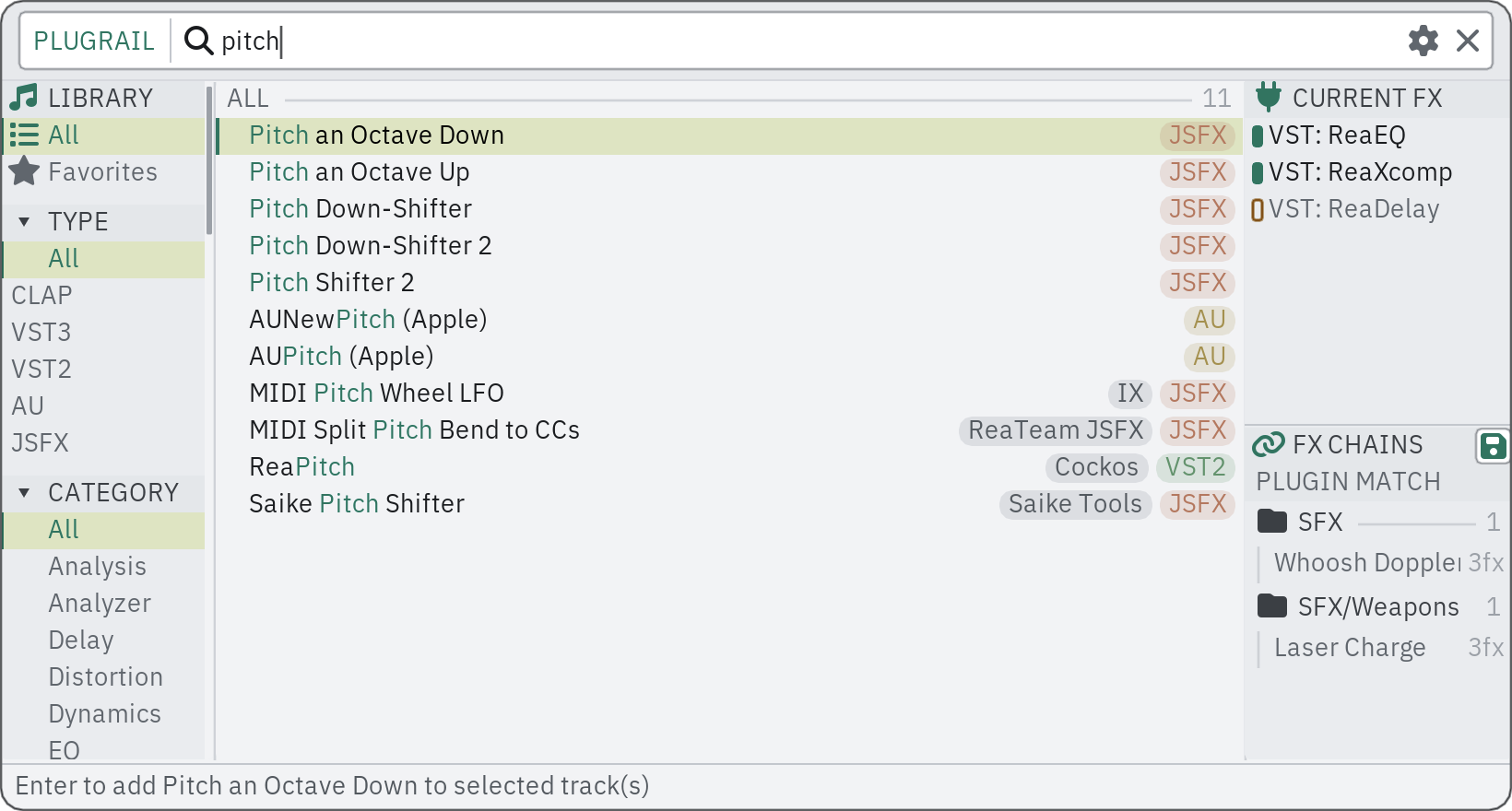
PlugRail opens at the mouse pointer, ready to type, and learns what you pick, so the plug-in you want is usually at the top.
What it does
- Search that fits how you type: "pq3" finds Pro-Q 3, "valhala" still finds Valhalla, and among equal matches the plug-ins you use most come first.
- Every installed plug-in in one list; one installed in several formats shows once, in the format you prefer. Narrow it by format, category or developer.
- Favourites with your own tags, and recent picks at the top of the list.
- Inserts on all the selected tracks at once, or as take FX on each selected item's active take; the window stays open for the next one.
- Your FX chains in the same window, found by name or by a plug-in inside them and shown before they load; the selected track's FX can be saved as a new chain.
- CURRENT FX shows what is already on the selected track or item, and a plug-in can be opened, bypassed or removed from there.
- SampleRecast and MediaQuiver have a PlugRail panel built in, with the same favourites, recent picks and learned searches.
What you need
- REAPER
- 7.0 or later
- ReaImGui
- 0.10 or later (from ReaPack)
- System
- Windows or macOS
Optional
- js_ReaScriptAPI, SWS: smaller conveniences; everything works without them.
Price and licence
Free. PlugRail asks for a licence key like the paid tools do: get one at no cost from its page in the shop and enter it in . More about keys.
Known issues
One to three lines, kept current.
Changes
3.33 2026-10-14
- Files that ReaPack left half-installed (names ending in .part) and that are not effects -- code libraries, pictures, preset files -- are no longer listed as plug-ins. A .part file that loads as an effect stays, unless the finished file is installed beside it.
- Fixed: a long developer name ("Native Instruments GmbH") no longer hides the plug-in's name in the list. The developer tag leaves out company endings such as GmbH or Inc., and is shortened with an ellipsis when the row is narrow; searching by the full developer name still works.
3.31 2026-10-13
- The ReaPack description says what the PlugRail panel inside SampleRecast and MediaQuiver shares with PlugRail.
Older versions
3.30 2026-10-13
- New: a smarter search. Plug-ins are found by their initials ("pq3" finds Pro-Q 3) and with one wrong letter, and PlugRail learns how you type: pick a plug-in after a search and the same search puts it first next time. Preferences > List shows how much it has learned and can forget it.
- New: Keep ready in the background (Preferences > General, off by default). PlugRail waits hidden and comes up at once, where the mouse is.
- New: Insert onto what is under the mouse (Preferences > General, off by default). Over an item, the plug-in goes on its take; over a track, on that track; over a plug-in in a track's FX list or in an FX chain window, right after it. Anywhere else, the selection is used as before. The bottom line says where it will go.
- The list is no longer cut at 800 plug-ins.
- Deleting or replacing an FX chain file asks first.
- The master track can be the target, and bypassed plug-ins are marked in CURRENT FX.
- A double-click on an FX chain follows the same choice between track and items as a plug-in does.
- Fixed: favourites, their tags and FX chain notes came back with only their first entry after REAPER was restarted.
- Fixed (macOS): the window could open with its lower part below the screen.
- Preferences: General, List, Appearance. Light is the default theme (a theme you chose yourself stays), with the same accent colour as the other products.
3.27 2026-10-07
- Fixed: the explanations in Preferences (Colors, Search) were cut off at the right edge of their cards. They now wrap.
- Fixed: the line at the bottom of the window sat against the window's bottom-left corner; it now has a band of its own and a margin.
- Fixed: spelling in Preferences (color).
3.21 2026-09-30
- Uses YH-M Shared 0.1.1: Japanese input is drawn inside the field also when the window is docked (with the optional YH-M native extension), and an ImGui error now reports its real cause.
3.20 2026-09-22
- Initial release.