 YH-M
YH-MSampleRecast
Granular and sampler instrument for the selected take in REAPER.
$70Early access price. It goes up to $99 at version 1.0.
On sale soon.
On sale soon.
Windows or macOS, REAPER 7.0 or later, ReaImGui 0.10 or later.
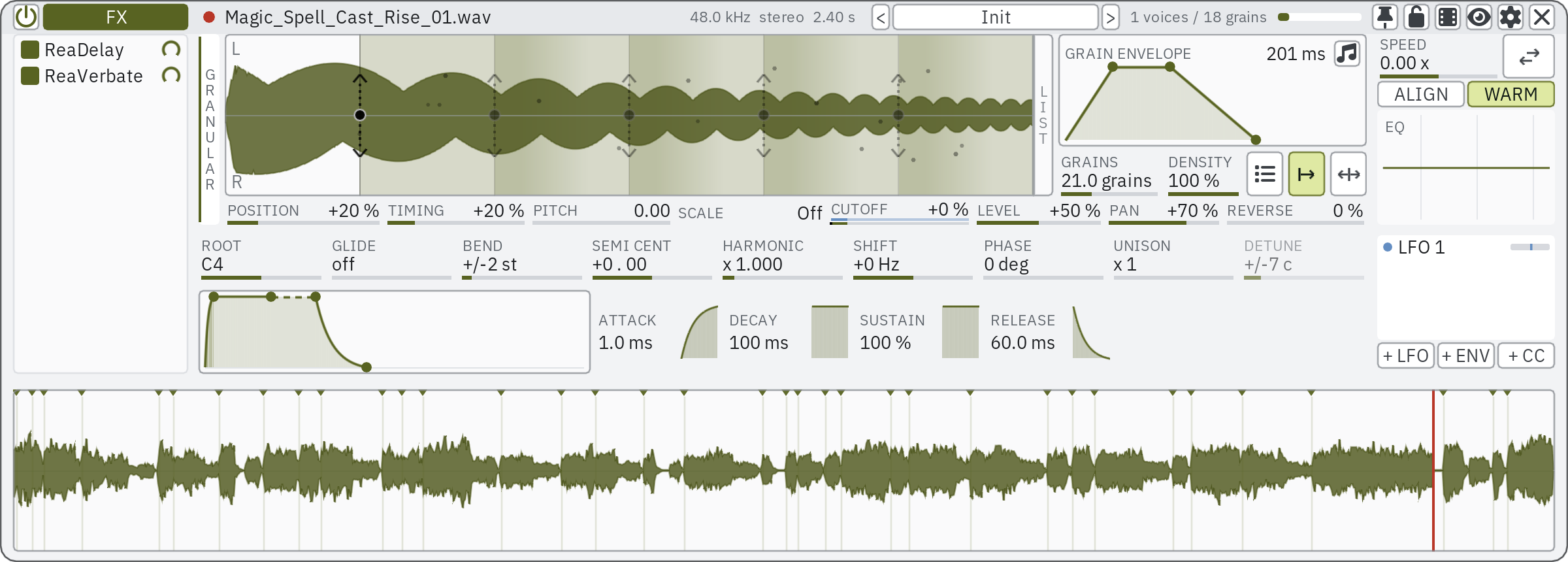
Select an item in REAPER and its take is the material. Play it from a MIDI keyboard, as grains or as a sampler, and move the grain positions and pitch while the notes sound. The last 30 seconds you played are always recorded, ready to go onto the arrange.
What it does
- Material comes from the selected item, a range selected in REAPER's Media Explorer, or an audio file dropped onto the waveform.
- Two sound sources: granular, or a sampler with up to 8 looped segments that can jump from one to another at random.
- Up to 8 grain positions on the waveform: snap them to transients, lay one on each transient, or roll the dice for a new grain character.
- Each position has its own grain envelope, randomisation of position, timing, pitch, level, pan and reverse, a 3-band EQ per grain, and up to 8 detuned unison copies. Random pitch can snap to a scale.
- Played from a MIDI keyboard: 32 voices, velocity, and pitch bend that also bends the grains already sounding.
- The track's FX chain sits in the window, and PlugRail's search adds plug-ins to it.
- Save your own presets; grain positions are stored as proportions, so a preset fits other material too.
- Playing to picture: while notes are held, the edit cursor walks forward and REAPER's video window follows; when they are released it jumps back. The transport never runs.
- What lands on the arrange is one item with two takes: the audio you heard, and the MIDI you played with the engine and the plug-ins after it as take FX, so the passage can be edited or played again.
- Modulation per grain position: up to 8 modulators (LFO, envelope or MIDI CC) move most of each position's controls through up to 48 connections, each with its own depth; the same modulators can also move the knobs of plug-ins in the chain.
What you need
- REAPER
- 7.0 or later
- ReaImGui
- 0.10 or later (from ReaPack)
- System
- Windows or macOS
Optional
- YH-M Native extension: drag what you played into other applications, not only onto the arrange.
- js_ReaScriptAPI, SWS: smaller conveniences; everything works without them.
Price and licence
- Price
- $70 USD, the early access price. It goes up to $99 at version 1.0. Where tax applies, Gumroad adds it at checkout.
- Trial
- 14 days with every feature, before you buy. No key and no card needed: install it with ReaPack and run it.
- Licence
- One person, on up to three of their own computers.
- Updates
- Every 1.x update is included, through ReaPack.
- Refunds
- Sales are final: the trial is there to try it first. This does not limit your statutory rights.
Known issues
One to three lines, kept current.
Changes
0.1.13 2026-10-14
- The PlugRail panel: a long developer name no longer hides the plug-in's name.
- The PlugRail panel: half-installed ReaPack files that are not effects (code libraries, pictures) are no longer listed as plug-ins.
- The description shown in ReaPack now says what SampleRecast does today.
0.1.11 2026-10-13
- Fixed: after the dice, Transients > Replace all points or Reset every parameter left fewer points, modulation connected to the points that were gone stayed behind unseen, counted against the 48 connections, and came back on a point added later. They are now removed; the remaining points keep theirs.
Older versions
0.1.10 2026-10-13
- New: every point knob is modulated per point. The 18 knobs that shape the grains (GRAINS, RATE, the RND row, CUTOFF, HARMONIC, SHIFT, PHASE and the grain envelope) took one modulation for all points; now each point has its own, like the other 17. Modulation saved by an earlier version is given to every point when it loads, at the same depth. Up to 48 routes; reaching the limit is announced.
- New: with several points selected, values that differ are shown: a faint range on value bars, "Mixed" on choice cells, each point's value in the tooltip, the other points' grain envelopes and EQ curves drawn faintly, and the choices the other points use underlined. A value set on one can be given to every selected point.
- Dropping a modulator with several points selected connects each of them, and the depth strip moves all of them. Deleting a point keeps the other points' modulation right.
- A modulated RND CUTOFF alone now turns the per-grain EQ on.
- The engine (JSFX) is updated. Sessions saved with this version and with the one before load in either.
- Fixed: the depth strip's tooltip never showed.
- Fixed: percentage cells read a typed number as 0 to 1 ("40" became 100 %).
- Fixed: labels on the grain envelope graph overlapped its title while a modulator was dragged over it.
- Fixed: an older preset read as modified right after loading.
- Preferences: Material, Playing, Appearance, Engine. Light is the default theme (a theme you chose yourself stays).
- The PlugRail panel searches the way PlugRail does and lists every plug-in.
0.1.7 2026-10-07
- Fixed: when the engine track does not exist yet, the Create the SampleRecast track button was glued to the top bar, away from the sentence that points at it. The two now sit together in the middle of the window.
- Fixed: spelling in Preferences (color).
- Fixed: typing a preset name and clicking Save did nothing (only Enter saved it).
- Deleting a preset from the list's right-click menu now asks first.
- New: keep the points when the material changes (the pin button next to the lock, or Preferences > Keep points across materials). Points you edited are written to the previous take before switching.
- Media Explorer range: a short range in a long file is no longer ignored; the lock is no longer carried over to the next start; while locked the bar says that the Media Explorer range was not loaded; Preferences > Load the Media Explorer range reads it by hand.
- Fixed: on macOS, while REAPER's "new version" notice was on screen, the window could be drawn twice in one frame and stop with an ImGui error (requires YH-M Shared 0.1.7).
0.1.1 2026-09-30
- Items dropped from the live strip follow REAPER's "loop source" preference for imported media instead of always looping.
- The MIDI take of a dropped item starts and ends exactly at the dragged range (it used to end at the last note).
- The MIDI take now carries the plug-ins inserted after the engine on the SampleRecast track, so it sounds like the audio take. Plug-in windows are not opened and track automation is not copied.
- The on-screen keyboard fills the window width, like REAPER's virtual keyboard; octave labels stay readable on narrow keys.
0.1.0 2026-09-22
- Initial release.